
If you’ve ever opened your email and seen a message saying you just bought Bitcoin through PayPal, even though you definitely didn’t, you’ve already brushed up against this scam. It’s been going around a lot lately, and it’s catching people off guard because it looks just real enough to make you stop and think.
This so-called “PayPal Coinbase charge” alert isn’t legit. It’s a phishing and impersonation scam built around one simple idea: make you panic first, think later.
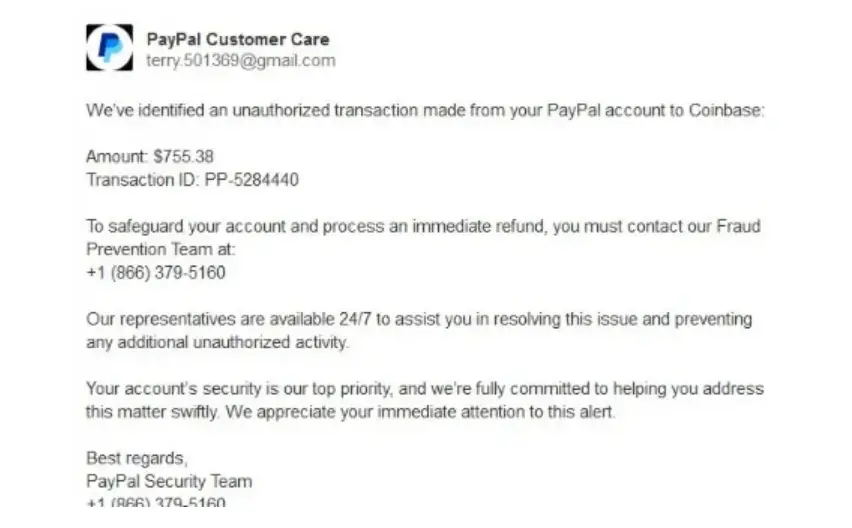
What the PayPal Coinbase Scam Looks Like
Most people first see it as an email or invoice that appears to come from PayPal or mentions a purchase through Coinbase. The message usually claims you’ve been charged for a Bitcoin transaction, something like $399, $499, $799, even up to $999.
The wording is always urgent. Something along the lines of: “If you did not authorize this transaction, call support immediately.” That line is the whole setup.
Why the Amount Feels “Just Right”
Here’s something most people don’t notice right away. The amount isn’t random. It’s carefully chosen. It’s high enough to make you nervous, but not so high that you instantly assume it’s fake.
If the email said you spent $10,000, you’d probably laugh it off. But $499? $799? That feels possible. That’s what gets people.
The Real Trap (It’s Not Just the Email)
The email itself isn’t the end goal. It’s just the hook.
What they really want is for you to call the number listed in the message. That number doesn’t go to PayPal or Coinbase, it goes straight to a scammer pretending to be customer support.
Once you’re on the phone, they’ll act helpful, calm you down, and then slowly guide you into “fixing” the issue. That might involve giving them access to your computer, logging into your accounts, or even sending money to “reverse” the transaction.
At that point, you’re not dealing with a fake invoice anymore, you’re dealing with full-on fraud.
How They Make It Look Real
These messages can be surprisingly convincing. Some use actual PayPal-style invoices. Others mimic official email formats, logos, and language. It’s not the sloppy scam emails people used to joke about.
Everything is designed to feel just real enough that you don’t question it immediately.
The Simple Reality Check
Here’s the easiest way to cut through all of it: real companies like PayPal and Coinbase don’t ask you to call random phone numbers from an email to fix urgent issues.
If there’s ever a real problem, you can log into your account directly, through the official website or app and check it yourself. No guessing, no pressure, no middleman.
What You Should Do If You Get One
If you see one of these messages, don’t call the number, don’t click anything, and don’t reply. Just ignore it or delete it. If you’re worried it might be real, open a new tab, go directly to PayPal or Coinbase, and check your account there. That’s it. No need to interact with the message at all.
If You Already Called or Clicked
If you’ve already engaged with the scam, don’t panic, but act quickly. Change your passwords, enable two-factor authentication, and contact your bank or card provider if any financial info was shared.
The faster you move, the better your chances of limiting any damage.
Here are some effective ways to protect yourself from phishing attacks:
Tips to Avoid Phishing Scams:
- Be Skeptical of Unexpected Communications:
- Be cautious with unsolicited emails, texts, or calls, especially those asking for personal or financial information.
- Verify the Source:
- Always verify the sender’s email address or phone number. Scammers often use addresses or numbers that look similar to legitimate ones.
- Look for Red Flags:
- Check for spelling and grammatical errors, generic greetings (e.g., “Dear Customer”), and urgent or threatening language.
- Don’t Click on Suspicious Links:
- Hover over links to see the actual URL before clicking. If it looks suspicious or doesn’t match the purported sender, don’t click it.
- Check the Website’s Security:
- When entering personal information online, ensure the website is secure. Look for “https://” in the URL and a padlock icon in the browser’s address bar.
- Avoid Downloading Attachments:
- Don’t open email attachments from unknown or suspicious sources. These could contain malware.
- Use Multi-Factor Authentication (MFA):
- Enable factor Authentication on your accounts so as to add an extra layer of security. This makes it harder for scammers to gain access even if they have your password.
- Report Phishing Attempts:
- Report suspicious emails to your email provider and the organization being impersonated. In the U.S., you can forward phishing emails to the Anti-Phishing Working Group at [email protected] and to the FTC at [email protected].
What Do You Do When You Suspect A Phishing Attempt
In this digital age and time, almost everyone has at one time received a phishing text or email and often times they fall victim and get scammed. This is why it is imperative that you are always careful when you receive any text or email because one careless click on a link can cause a whole lot of problems for you. Now if you suspect a phishing attempt, here is what I advise you do:
- Do Not Respond to the text, because you responding is actually giving access to the scammers, simply delete it when you receive.
- Quickly change your password if you have mistakenly clicked on the link or given away your login details. Change your password to a strong and unique password.
- Keep an eye on your accounts for any unauthorized transactions.
- Also scan you devices for any malware.
By following these tips, you can significantly reduce your risk of falling victim to phishing scams and keep your personal and financial information safe.
Conclusion
The PayPal Coinbase scam works because it plays on urgency and fear. It doesn’t rely on complicated tricks, just a believable message and the hope that you’ll react before thinking it through.
Once you understand how it works, it becomes a lot easier to spot. Any unexpected charge notification that pushes you to act immediately, especially by calling a number, is worth questioning.
Because in most cases like this, the transaction isn’t real…the setup is. Just like the Parisi Invoice scam, the PayPal Coinbase scam is a scam invoice sent by fraudsters.