
If you have been looking at 3D printers, you will know that the difference between a basic machine and a more advanced model can be quite significant. Some printers are designed for simple projects using one filament, while others offer features that let you work with different colours and materials without constantly stopping to change things. The QIDI Q3D is being presented as one of the more advanced options, with dual-head printing, a heated chamber and a number of features aimed at improving print quality.
On paper, there is quite a lot to like. It has a build volume of 260 x 260 x 260 mm, a chamber that can reach 70°C and a quick-swap nozzle capable of reaching 350°C. It also comes with an eddy-current sensor for first-layer adjustments and a dual-head system intended to make multi-material and multi-colour printing easier.
But I would not judge a 3D printer by its specification list alone. What matters is whether those features work well together, how much effort the machine takes to set up and maintain, and whether the extra technology actually makes printing easier. So, let’s look at what the QIDI Q3D offers and what buyers should consider before spending their money.
What Is the QIDI Q3D 3D Printer?
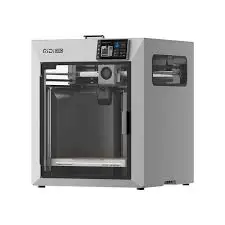
The QIDI Q3D is a 3D printer designed for people who want more flexibility than a standard single-nozzle machine can offer. Its main selling point is the dual-head printing system, which allows it to work with more than one filament during a print. This can be useful when creating multi-colour models or combining different materials in one project.
For example, someone making decorative models may want different colours in the same object, while a more experienced user might want to combine a main printing material with a separate support material. Having two print heads can make these projects more convenient, depending on how the system handles filament changes and how well the printer is calibrated.
The Q3D also has a 260 x 260 x 260 mm build area, giving users room to print reasonably sized objects without having to split every larger design into several pieces. It is not an enormous industrial printer, but the space should be useful for home projects, prototypes, models and other everyday printing work.
Dual-Head Printing and Multi-Material Support
The dual-head system is probably the feature that will attract the most attention. Instead of relying on one nozzle to handle every filament, the QIDI Q3D has two printing heads, which are intended to make multi-colour and multi-material projects possible.
This sounds great, particularly if you regularly print objects that need different colours or support materials. With the right setup, it can save some of the inconvenience involved in changing filament manually and allow more complicated designs to be produced in one print.
However, dual-head printing is not automatically better than single-head printing. The printer still needs to manage both heads accurately, and poor calibration can lead to problems such as uneven layers, unwanted marks or material being deposited where it should not be. It is also worth considering how easy it is to maintain the two heads and whether the software makes switching between them straightforward.
For someone who only prints simple models in one colour, this feature may not make much difference. But if you enjoy experimenting with different materials or want to produce more detailed designs, it could be one of the more useful reasons to consider the Q3D.
The Heated Chamber and 350°C Nozzle
Another feature worth looking at is the heated chamber, which is advertised as reaching temperatures of up to 70°C. This is useful because some printing materials are more difficult to work with when the temperature around the print changes too quickly.
Materials such as ABS and ASA can shrink as they cool, which may cause corners to lift from the build plate or lead to cracks in larger prints. A heated chamber helps keep the printing environment more stable, reducing temperature changes while the object is being made.
The Q3D also has a quick-swap nozzle that can reach 350°C. A high nozzle temperature gives a printer more flexibility when working with materials that require higher printing temperatures. It may also be useful for users who want to experiment beyond the common filaments used for basic home printing.
Still, the maximum temperature is only part of the story. The printer must also have the right hotend components, filament path and temperature control to handle demanding materials safely and consistently. I would not assume that every high-temperature filament will work perfectly just because the nozzle can reach 350°C.
Eddy-Current Sensor and First-Layer Accuracy
Anyone who has used a 3D printer knows how frustrating a poor first layer can be. If the nozzle is too close to the build plate, the filament may not come out properly. If it is too far away, the first layer may fail to stick, and the entire print can be ruined before it has really started.
QIDI includes an eddy-current sensor on the Q3D to help improve first-layer precision. The sensor is designed to measure the distance between the print head and the build surface, helping the printer make more accurate adjustments.
This is a useful feature because getting the first layer right can save a lot of time and wasted filament. It is particularly helpful for people who do not want to keep adjusting the bed manually every time they start a new project. However, automatic measuring does not mean you will never need to check the build plate or make adjustments. The condition of the surface, calibration and general machine setup still matter.
Other Features: Linear Rails, Display and LED Indicators
The QIDI Q3D also includes X-axis linear rails, which are intended to provide smoother and more controlled movement during printing. Movement accuracy matters because even small inconsistencies can affect the appearance of a finished model, particularly when printing detailed objects.
The machine is also described as having a lightweight construction, a full-colour display and LED status indicators. The display should make it easier to access settings and monitor printing information, while the lights give users a quick visual indication of what the printer is doing.
These features may not be as exciting as the dual-head system or heated chamber, but they still contribute to the overall experience. A printer can have impressive technical specifications and still be frustrating to use if its controls are confusing or it is difficult to monitor a job.
Is the QIDI Q3D Suitable for Beginners?
I would say the QIDI Q3D is more appealing to people who already have some interest in 3D printing and want to move beyond basic projects. Its dual-head system, heated chamber and high-temperature nozzle offer more flexibility, but they also introduce more things to understand.
A beginner who simply wants to print small toys, household accessories or basic models may not need all this extra technology. A simpler single-head printer could be easier to learn on and may cost less to maintain.
That does not mean a beginner cannot use the Q3D. The eddy-current sensor and full-colour display could make certain parts of the process easier, but there is still a learning curve when dealing with different filaments, temperatures and dual-head printing. Anyone buying it as their first printer should be comfortable spending some time learning how the settings work.
For experienced users, the appeal is clearer. The larger build area, heated chamber and ability to work with multiple filaments could make it a useful machine for more demanding projects, provided the printer performs as advertised.
What Should You Consider Before Buying?
The specifications make the QIDI Q3D sound capable, but I would want to know more about its day-to-day reliability before treating it as a worthwhile investment. In particular, the dual-head system needs to be easy to calibrate and maintain. If changing between heads becomes a regular source of failed prints, the feature could end up creating more work rather than saving time.
The same applies to the heated chamber and high-temperature nozzle. A 70°C chamber and 350°C nozzle sound impressive, but buyers should check which materials the manufacturer actually supports and whether the machine has any material restrictions. The printer’s software, replacement parts, warranty and availability of technical support are also worth checking, especially if you plan to use it regularly.
I would also compare the Q3D with other printers in its price range rather than focusing only on the number of features. A machine that is easier to maintain and produces consistent prints may be a better purchase than one with a longer specification list but a more complicated setup.
Is the QIDI Q3D 3D Printer Worth It?
The QIDI Q3D has several features that make it an interesting option for anyone who wants to do more with 3D printing. The 260 x 260 x 260 mm build volume gives you useful printing space, while the dual-head system opens up possibilities for multi-colour and multi-material projects. The heated chamber, 350°C quick-swap nozzle and eddy-current sensor also make it look more capable than a basic entry-level machine.
However, I would not recommend buying it simply because the specifications sound impressive. The real value depends on how reliably the two print heads work, how easy the machine is to maintain and whether it can consistently handle the materials you intend to use.
My view is that the QIDI Q3D makes more sense for experienced hobbyists, makers and people who actually need dual-head printing and a heated chamber. If you are just starting out or mainly print simple objects, you may be paying for features you will rarely use. It has the potential to be a useful machine, but I would make the purchase based on its actual performance, support and price rather than the marketing claims alone.
Check out Necklow Sleep Pillow that I reviewed, earlier.