
There is something about seeing an Apple account alert that makes you pay attention immediately. When the message says there has been a suspicious login, your Apple ID is about to be locked, an unfamiliar device has accessed your account, or a payment needs to be verified, it is very easy to forget that the message itself might be the problem. You are not thinking about phishing at that point. You are thinking about your photos, iCloud, saved passwords, subscriptions, contacts and everything else connected to your Apple Account.
That is exactly where the Apple ID account alert scam gets its opportunity. The scammer does not necessarily need to break into your Apple Account first. They can simply send you a convincing message that looks as though Apple has detected a security problem and then give you a convenient button or link to “secure” the account. Once you follow that link, you may be taken to a fake Apple login page designed to collect your Apple Account email address, password, verification code or other personal information.
Apple itself warns that scammers use fraudulent emails and other messages that look like they come from Apple, along with fake support calls, misleading security pop-ups and other social-engineering techniques.
So if you have received an Apple ID account alert text, an email saying your Apple ID has been compromised, or a message telling you to verify your account immediately, the important question is not whether the message looks professional. The important question is whether you can verify the alleged problem without using anything provided by the sender.
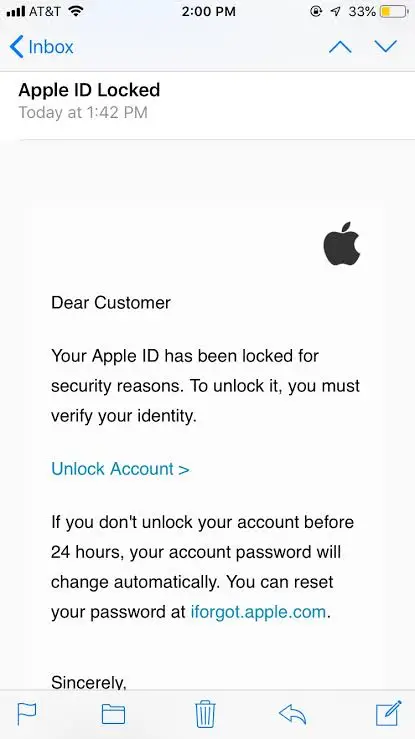
What Is the Apple ID Account Alert Scam?
The Apple ID account alert scam is a phishing scheme that impersonates Apple and tries to convince you that something is wrong with your account. The wording changes, but the basic story usually involves a security problem that supposedly needs your immediate attention.
You might receive a message saying someone attempted to sign into your Apple ID. Another version may claim your account has been locked, your payment information needs updating, an unfamiliar purchase was made, your iCloud storage is about to be disabled, or your account will be permanently suspended unless you verify your identity.
There is usually a link somewhere in the message. That link is presented as the solution to the problem.
The scam works because the recipient already has a relationship with the company being impersonated. If you own an iPhone, iPad or Mac and use iCloud, the idea that Apple might have detected something unusual does not sound far-fetched. The message only needs to create enough uncertainty for you to click before you stop and check the account yourself.
The FTC has specifically warned about phishing messages that pretend to come from companies such as Apple and claim there has been suspicious activity or a problem with an account. The goal is to persuade people to click a link and hand over sensitive information.
What Does the Fake Apple ID Alert Say?
There is no single script used by every scammer, which is one reason searching for the exact wording of a message is not a particularly reliable way to determine whether it is legitimate.
Some messages are very short and say something along the lines of, “Your Apple ID has been locked due to suspicious activity.” Others are written more like a formal security notification and include a date, location, device name or supposed login attempt. You may be told that somebody in another city or country attempted to access your account and that you need to confirm your identity.
Then there is the increasingly common payment-related version. The message may claim that an expensive Apple purchase has just been made and ask you to cancel it. The supposed cancellation link takes you to a fake Apple login page or, in some cases, leads you toward a fake customer-support operation.
There are also messages pretending to be Apple Support and telling you that your account has been compromised. The recipient is encouraged to call a telephone number or speak with a supposed Apple representative.
Apple specifically warns that scammers may impersonate Apple Support and other trusted entities through phone calls and other communications in an attempt to obtain sign-in credentials, security codes and financial information.
That is why I would not judge an Apple account alert by its wording alone. A scammer can copy Apple’s language surprisingly well.
The Link Is Usually the Part You Need to Ignore
The most important thing about these messages is that the link does not become safe simply because the page it opens looks like Apple.
A fake Apple login page can contain the Apple logo, familiar fonts, account-security language and a sign-in box that looks almost identical to what you would expect. On a phone screen, especially when you are worried about your account, there may be very little that immediately looks wrong.
The page may ask for your Apple Account email address and password first. After that, it could ask for the six-digit two-factor authentication code sent to your trusted device or phone number.
That second request is particularly dangerous. A scammer who already has your password may be trying to obtain the verification code that protects the account. Apple says never to give another person your Apple Account password, verification codes, device passcode or other account-security information.
The FTC gives similar advice for unexpected account-security messages: don’t click the link. If you are concerned about an account, contact the company using a website or telephone number you already know is genuine rather than using the information supplied in the suspicious message.
But What If the Apple Alert Looks Completely Real?
This is where things can get confusing because Apple really does send legitimate account notifications.
Apple says it may notify you about account activity you do not recognize, such as an Apple Account being used to sign in on a device you do not know or a password being changed without your permission. Apple also says an unexpected two-factor authentication code can be an indication that somebody is attempting to access the account.
So seeing an Apple security notification does not automatically mean you are being scammed.
The mistake is assuming that every message claiming to be an Apple security alert is genuine.
If you receive a legitimate Apple notification, you can verify what happened directly through your Apple Account and trusted devices. You do not need to use a suspicious link in an email or text to investigate.
That distinction is important because scammers deliberately take something that Apple genuinely does—security alerts—and turn it into an excuse to steal your login information.
Apple ID or Apple Account?
You may notice that older scam messages talk about an Apple ID, while Apple’s current terminology increasingly uses Apple Account.
Apple made the terminology change from Apple ID to Apple Account, but scammers still use both phrases because “Apple ID” remains familiar to millions of people.
So don’t assume that a message is genuine because it uses the newer wording, and don’t assume it is fake because it says Apple ID. Neither phrase proves anything about where the message came from.
The same applies to Apple’s logo, colors, copyright wording or a long legal disclaimer at the bottom of the message. Those details can all be copied.
The “Suspicious Login” Story Is Designed to Make You Act Quickly
A message telling you that somebody tried to access your account produces a very different reaction from an ordinary advertisement.
You immediately start wondering whether someone knows your password. You may think about the personal photographs stored in iCloud or the payment methods attached to your account. If you use your Apple Account across several devices, the thought of being locked out can be particularly unsettling.
That emotional reaction is useful to the scammer because it encourages you to solve the problem immediately.
The FTC describes this as a common phishing technique. Scammers may claim there has been suspicious activity or a login attempt and then tell you to click a link to fix the supposed problem.
The safer response is almost the opposite of what the message asks you to do. Slow down, close the message and check your account independently.
What If You Receive an Apple Verification Code You Didn’t Request?
This one deserves a little more attention because it can mean something different from a random phishing message.
If you suddenly receive an Apple two-factor authentication code that you did not request, someone may actually be attempting to sign in with your credentials. Apple lists an unrequested two-factor authentication code among the signs that an Apple Account may have been compromised.
That does not mean you should give the code to the person who contacts you afterward.
In fact, the code may be exactly what the attacker needs to complete the login. A scammer may send you a fake Apple alert, then contact you by phone pretending to be Apple Support and ask you to read the verification code back to them.
Don’t do it.
If you receive a code you did not request, go directly into your Apple Account and check the devices and security information associated with it. Apple recommends reviewing account information and removing devices you do not recognize if you believe someone has gained access.
The Fake Apple Support Phone Call Can Come Next
One of the more convincing versions of this scam does not stop with the text or email.
You might receive an alert saying there was a suspicious purchase or login, followed by instructions to call a number for Apple Support. A person answers and already knows some basic information about you, which can make the conversation feel legitimate.
The supposed support agent then asks you to confirm your identity. Eventually, the requests become more sensitive. They may want your Apple Account password, verification code, device passcode, payment information or permission to install software.
Apple warns about fraudulent calls that impersonate Apple Support, while the FTC has separately warned about urgent security messages that push people toward fake technical-support operations.
If you need Apple Support, start from Apple’s official website or the Apple Support app rather than using a telephone number supplied by a suspicious alert.
How Can You Tell If an Apple Account Alert Is Fake?
I wouldn’t rely on one tiny spelling mistake or a strange-looking email address because modern phishing messages can be much better than that.
Instead, look at the entire situation. Did you actually initiate an account change? Did you make the purchase mentioned in the message? Were you expecting a notification? Does the message want you to click a link to sign in or update payment information?
Most importantly, ask yourself whether you can verify the alleged problem without interacting with the message.
If the answer is yes, that’s what I would do.
Open your iPhone’s Settings, check your Apple Account information, review your devices and purchases, or manually enter Apple’s official website into your browser. Do not let the suspicious message determine where you go.
Apple recommends using trusted Apple settings and account.apple.com for account-related changes rather than responding to suspicious messages.
Is the Apple ID Account Alert Scam Real?
Yes. Apple ID account alert scams are real phishing attacks, and Apple itself warns customers about fraudulent messages, fake support calls and other social-engineering attempts that impersonate Apple.
That does not mean every Apple security alert you receive is fake. Genuine Apple notifications exist, and an unexpected sign-in notification or verification code can sometimes indicate that somebody really is trying to access your account.
The trick is not to decide whether the message looks official. Verify the underlying account activity somewhere the scammer does not control.
That’s the part that makes this scam much easier to deal with once you understand it. You don’t have to become an expert at spotting fake Apple logos or memorize every scam message currently circulating. You simply need to stop allowing an unexpected message to become your route into your own account.
What Should You Do If You Get an Apple ID Account Alert Text?
If the message is unexpected, don’t click the link and don’t reply. If it contains a telephone number, don’t assume that number belongs to Apple just because the message says it does.
Go directly to your Apple Account through your device or a trusted Apple website and check for anything unusual. Look at the devices connected to your account, recent purchases and account-security information. If you find activity you do not recognize, change your password and secure the account.
Apple says that if you believe your account has been compromised, you should change your Apple Account password and make sure two-factor authentication is enabled.
If you received a suspicious email pretending to be Apple, Apple says you can forward it to [email protected]. Suspicious text messages can also be reported through your messaging service or forwarded to 7726 (SPAM), and phishing attempts can be reported to the FTC.
What If You Already Entered Your Apple Password?
This is the point where I would stop worrying about whether the original message was “probably a scam” and start securing the account.
If you entered your Apple Account password on a website reached through a suspicious message, change that password immediately using a trusted Apple device or Apple’s legitimate account site. Don’t reuse the compromised password elsewhere.
Apple specifically advises changing your Apple Account password immediately if you believe you entered your password or other personal information on a scam website.
If you gave the scammer a verification code, device passcode or financial information, the situation deserves additional attention. Check your account and devices carefully, contact your financial institution if payment information was exposed, and use Apple’s official support channels if you need help recovering the account.
Apple ID Account Alert Scam Review: My Verdict
The Apple ID account alert scam is convincing because the story behind it is completely believable. Apple really does monitor account activity. Apple really does send security notifications. People really do receive two-factor authentication codes when someone attempts to sign in. That gives scammers a genuine piece of Apple’s security system to build their fake messages around.
The mistake is letting the message become your source of truth.
A text saying “Your Apple ID has been compromised,” “Suspicious login detected,” “Your account will be locked,” or “Confirm your Apple ID immediately” should not be treated as proof that your account has been hacked. It may simply be a phishing message trying to frighten you into clicking a link.
At the same time, I would not ignore every Apple security notification either. If you receive an authentication code you didn’t request or discover a device, purchase or account change you don’t recognize, take that seriously and check your account directly. Apple lists these kinds of unfamiliar activities among the signs that an account may actually have been compromised.
For me, the simplest rule is this: an Apple alert should lead you to check your Apple Account, not to click a random link in a message. If something really happened, you’ll be able to find evidence of it through Apple’s own systems. If nothing happened, you’ve avoided handing your password and security code to somebody who was hoping you would panic first and think later.
Bottom line: the Apple ID account alert may look like a security warning, but the message itself may be the attack. Verify everything directly with Apple before entering a password, sharing a verification code, making a payment or speaking to anyone who contacted you unexpectedly.
Checkout The Back Taxes Scam Call, I talked about earlier.