
The Lofree Flow Lite was already a good keyboard, so when I heard about the Flow Lite 2, I wanted to see what Lofree had actually changed. At first glance, it looks like a better version of the same keyboard rather than a completely new product. There are a few useful upgrades, especially the bigger battery and the small display, but I am not convinced that owners of the original need to rush out and buy another one.
For anyone who has not tried the first Flow Lite, though, the new model looks like a very attractive option. It is a low-profile mechanical keyboard designed for people who want something comfortable to type on without spending a fortune on a high-end mechanical keyboard. It comes in two layouts, has wireless and wired connections, and gives you the option to change switches. Lofree has kept the features that made the original popular while making a few changes that should improve everyday use.
What Is New About the Lofree Flow Lite 2?
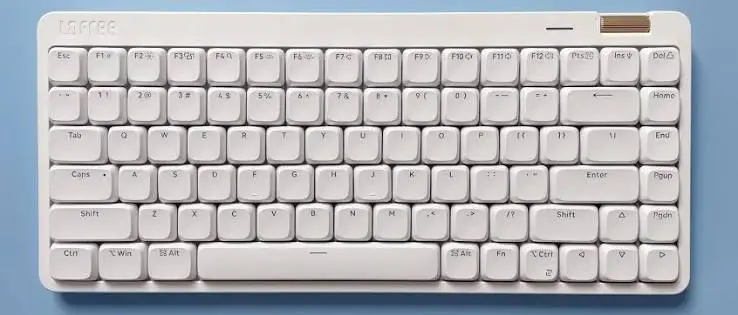
The biggest upgrade is the battery. The Flow Lite 2 now has a 3,000mAh battery, compared with the 2,000mAh battery in the original 84-key version. Lofree claims it can last up to 100 hours over Bluetooth with the backlighting turned off. That should mean fewer charging breaks, although actual battery life will depend on how you use the keyboard, particularly if you leave the lights on.
There is also a small built-in display that shows useful information such as the connection mode, operating system layout and battery level. It is not something that will change how you type, but I can see it being handy when switching between devices or checking how much charge is left. It is one of those additions that makes the keyboard feel a little more polished.
Lofree has also updated the switches. The Flow Lite 2 uses full POM low-profile mechanical switches, with an operating force increased from 40gf to 45gf. The idea is to give each keypress a slightly firmer and more controlled feel. The transparent switch housing also allows more of the backlighting to shine through, which should make the lighting look better than before.
The keyboard retains hot-swappable switches, so you are not stuck with the switches that came installed. This is a nice feature if you enjoy changing the feel of your keyboard or want to experiment with different switches later. It also has a gasket-mounted structure, which is designed to soften the typing feel and reduce unwanted vibrations.
Build Quality and Typing Experience
The Flow Lite 2 uses a flatter ABS plastic case and double-shot PBT keycaps. PBT keycaps are generally appreciated because they hold up better against shine from regular use than many cheaper keycaps. The overall design remains low-profile, which makes it a good option for people who do not want the taller, bulkier feel of traditional mechanical keyboards.
One thing I like about the Flow Lite range is that it offers a mechanical keyboard experience without making the whole setup feel unnecessarily complicated. You get proper mechanical switches, a compact design and room for customisation, but you do not have to spend the sort of money people sometimes pay for enthusiast keyboards.
The Flow Lite 2 is available in an 84-key layout, which is roughly a 75% keyboard, and a larger 100-key version. The smaller layout saves desk space, while the 100-key version gives you more keys for everyday work. I would choose based on how often you use the number pad rather than paying extra for keys you may never touch.
Wireless Connections and Customisation
Connectivity is another area where Lofree has covered the basics. The Flow Lite 2 supports Bluetooth 5.3, 2.4GHz wireless and USB-C wired connections. It is compatible with Windows, macOS, iOS, iPadOS and Android, so you can use it with a desktop, laptop, tablet or phone.
The 2.4GHz connection supports a polling rate of up to 1,000Hz, which is useful for anyone who wants a more responsive wireless connection. Bluetooth is convenient for switching between everyday devices, while USB-C gives you a wired option when you need it.
For customisation, Lofree provides its Lofree Hub software, along with support for the open-source VIA tool. This gives users more control over their keyboard settings and key assignments. It is good to see that the company has not removed the customisation options that make mechanical keyboards appealing to people who like adjusting their setup.
Lofree Flow Lite 2 Price: How Much Does It Cost?
The advertised starting price is $109 for the 84-key version and $119 for the 100-key version. During launch promotions, Lofree has offered lower prices of around $87.20 and $95.20 respectively. Those discounts make the keyboard more appealing, especially if you are looking for a low-profile mechanical keyboard without spending too much.
However, I would not let a launch discount push you into buying something you do not need. If you already own the original Flow Lite and are happy with it, the extra battery capacity and display may not be enough to justify spending another $100 or more.
My Concern About the $2 Reservation Offer
There is something else I want to mention, particularly for anyone thinking about using the $2 reservation offer. I tried this when the original Flow Lite was being promoted, and the experience left me uncomfortable.
After making that reservation, I started receiving scam Kickstarter promotion emails from different domains that had nothing to do with Kickstarter. They kept coming for months, and I was left wondering how my PayPal email address had ended up with those senders. I cannot prove that Lofree itself sold or shared my details, and it may have happened through another service involved in the reservation process, but the timing made me wary.
I noticed that the PayPal button displayed in the banner on the Flow Lite 2 page was also confusing. It was not the payment option for the $2 reservation; it led to a purchase for a different keyboard listed at $169. Anyone interested in reserving the Flow Lite 2 should make sure they are using the correct reservation option rather than assuming every PayPal button on the page is for the same offer.
I have already paid the $2 reservation for the new model, but this time I did not use my main PayPal email address. I used contact details that forward to my main accounts and can be switched off if unwanted messages start arriving again. After what happened last time, I would rather be careful with the email address I hand over during these promotions.
Is the Lofree Flow Lite 2 Worth Buying?
I think the Flow Lite 2 looks like a good keyboard, but I see it as a small upgrade rather than a major improvement over the original. The larger battery is welcome, the display is a useful addition, and the updated switches may appeal to people who prefer a slightly firmer typing feel. Lofree has also kept the hot-swappable design and the different connection options, which are features I would want in a keyboard at this price.
If you already own the original Flow Lite, I would not rush to replace it. The first model is already a great keyboard, and the changes here do not look significant enough to make upgrading necessary. However, if you are buying your first low-profile mechanical keyboard, the Flow Lite 2 could be a very good choice, particularly when the launch discount is available.
I like what Lofree has done with the Flow Lite 2, and I expect it to be a good option for anyone looking for an affordable low-profile mechanical keyboard. The upgrades are welcome, but they are not enough to make me recommend replacing the original. My bigger reservation is about the $2 sign-up process and what happened to my email address after the previous launch. I cannot say who was responsible for the spam, but it was unpleasant enough that I would be careful about the contact details I use this time.
Check out Necklow Sleep Pillow that I reviewed, earlier.