
Getting a text about an unpaid parking charge is enough to make anyone stop and check. That’s exactly what scammers are counting on. Recently, many UK drivers have reported receiving a text claiming to be from ParkingEye, warning them about an outstanding parking balance that needs to be paid immediately.
At first glance, the message looks convincing. It uses the ParkingEye name, sounds official, and creates the impression that you’ve forgotten to pay for parking somewhere.
The problem is that it isn’t a real ParkingEye notice at all.
If you’ve received one of these messages, here’s what you need to know before clicking anything.
What Is the ParkingEye Outstanding Parking Balance Text?
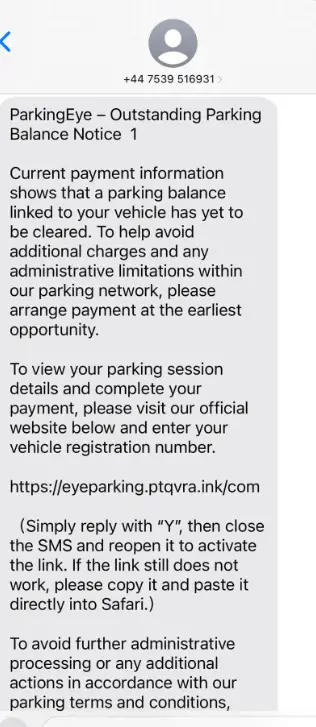
The scam begins with a text message claiming there’s an unpaid parking charge linked to your vehicle.
The message usually says that your “current payment information” shows an outstanding balance and warns that extra charges or administrative restrictions could be applied if you don’t pay quickly.
To make the message seem legitimate, it includes a link that appears to lead to ParkingEye’s payment website. You’re then asked to enter your vehicle registration number to view the supposed parking session and settle the outstanding balance. Everything is designed to make you act before you stop to think.
Why This Text Is a Scam
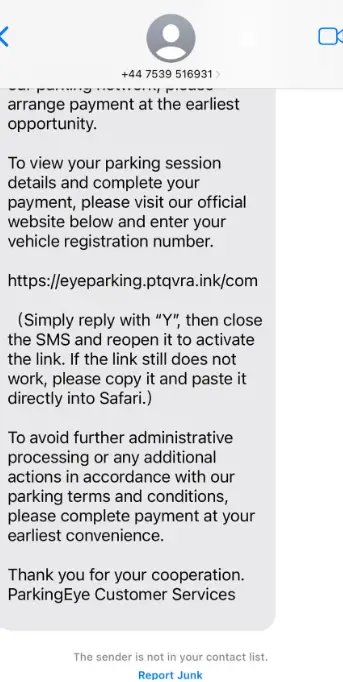
The biggest red flag is the sense of urgency.
The scammers want you to believe you’re about to face higher charges or penalties if you don’t pay immediately. That pressure is meant to stop you from questioning whether the message is genuine.
Another warning sign is the payment link.
Instead of visiting ParkingEye’s official website yourself, the text encourages you to click a link provided in the message. Phishing scams often use fake websites that closely resemble legitimate companies to steal payment details, personal information, or login credentials. If you enter your card information on one of these fake sites, it could end up in the hands of scammers.
How the Scam Works
The scam follows a pattern that’s becoming increasingly common.
First, you receive a text claiming you owe money for a parking charge.
Next, you’re encouraged to click a payment link before additional fees are added.
Once you visit the fake website, you’re asked to enter your vehicle registration number. From there, the site may display a fake balance and ask for your payment details to clear the supposed debt.
In reality, there may never have been a parking charge at all.
The entire process is simply designed to collect your financial information.
Signs the Message Isn’t Genuine
Several warning signs can help you spot this scam:
- It creates unnecessary urgency.
- It threatens extra charges if you don’t act quickly.
- It asks you to click a payment link in the text.
- It requests your vehicle registration number through an unfamiliar website.
- The message may come from a random mobile number rather than an official sender.
Even if the website looks professional, appearances alone don’t make it legitimate.
What You Should Do If You Receive the Text
If a ParkingEye Outstanding Parking Balance text lands in your inbox, don’t panic.
Instead:
- Don’t click the link.
- Don’t enter your vehicle registration number.
- Don’t provide payment or personal information.
- Delete the message or report it as spam.
- If you’re genuinely unsure whether you have an outstanding parking charge, visit ParkingEye’s official website by typing the address into your browser yourself instead of using the link in the text.
Taking a few extra minutes to verify the information independently is far safer than reacting to a message that could be fraudulent.
What If You Already Clicked the Link?
If you’ve already opened the website but didn’t enter any information, simply close the page.
If you entered your payment details, contact your bank or card provider immediately. They can monitor your account, block your card if necessary, and help prevent unauthorized transactions.
You should also change any passwords if you entered login information on the fake site.
Acting quickly can reduce the chances of scammers misusing your information.
Is the ParkingEye Outstanding Parking Balance Text Legit?
No. Based on the reports circulating and the way the message is designed, the ParkingEye Outstanding Parking Balance text is a phishing scam created to trick drivers into handing over personal and financial information.
The message relies on fear, urgency, and the trusted ParkingEye name to convince people to click before verifying whether the parking charge is real.
Who Can Be Targeted?
Almost anyone with an email address can receive this scam.
Cybercriminals frequently send millions of nearly identical emails using stolen or publicly available email lists. They aren’t choosing victims based on personal information. Instead, they rely on volume, hoping that a small percentage of recipients will believe the threats.
Tips to Avoid Phishing Scams:
- Be Skeptical of Unexpected Communications:
- Be cautious with unsolicited emails, texts, or calls, especially those asking for personal or financial information.
- Verify the Source:
- Always verify the sender’s email address or phone number. Scammers often use addresses or numbers that look similar to legitimate ones.
- Look for Red Flags:
- Check for spelling and grammatical errors, generic greetings (e.g., “Dear Customer”), and urgent or threatening language.
- Don’t Click on Suspicious Links:
- Hover over links to see the actual URL before clicking. If it looks suspicious or doesn’t match the purported sender, don’t click it.
- Check the Website’s Security:
- When entering personal information online, ensure the website is secure. Look for “https://” in the URL and a padlock icon in the browser’s address bar.
- Avoid Downloading Attachments:
- Don’t open email attachments from unknown or suspicious sources. These could contain malware.
- Use Multi-Factor Authentication (MFA):
- Enable factor Authentication on your accounts so as to add an extra layer of security. This makes it harder for scammers to gain access even if they have your password.
- Report Phishing Attempts:
- Report suspicious emails to your email provider and the organization being impersonated. In the U.S., you can forward phishing emails to the Anti-Phishing Working Group at [email protected] and to the FTC at [email protected].
What Do You Do When You Suspect A Phishing Attempt
In this digital age and time, almost everyone has at one time received a phishing text or email and often times they fall victim and get scammed. This is why it is imperative that you are always careful when you receive any text or email because one careless click on a link can cause a whole lot of problems for you. Now if you suspect a phishing attempt, here is what I advise you do:
- Do Not Respond to the text, because you responding is actually giving access to the scammers, simply delete it when you receive.
- Quickly change your password if you have mistakenly clicked on the link or given away your login details. Change your password to a strong and unique password.
- Keep an eye on your accounts for any unauthorized transactions.
- Also scan you devices for any malware.
By following these tips, you can significantly reduce your risk of falling victim to phishing scams and keep your personal and financial information safe.
Conclusion
If you receive this text, don’t pay the supposed balance through the link provided. Always check directly with the parking company using its official website or customer service channels. A few minutes of caution can save you from losing money or exposing your personal information to scammers.
Another of these types of scam is the Disney Plus Scam Emails,