
Streaming devices are supposed to make life easier, not turn movie night into a troubleshooting session.
That’s why I bought the vSeeBox. The ads made it sound like the perfect all-in-one Android TV box with tons of entertainment, smooth streaming, and an easy setup. For a while, I thought I had found a good alternative to paying for multiple streaming subscriptions.
Unfortunately, that excitement didn’t last.
The more I used it, the more problems I ran into, and trying to get help only made things worse.
Here’s my honest experience.
Why I Bought the vSeeBox
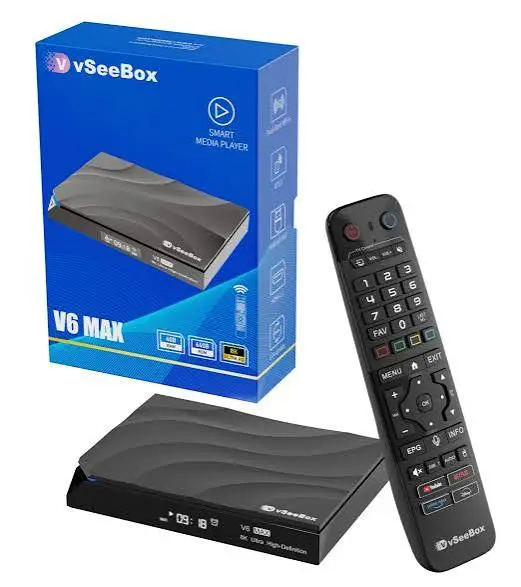
Like a lot of people, I was looking for a streaming device that could do more than the average TV box.
The company advertises access to a huge selection of content, video-on-demand features, and an easy plug-and-play setup. On paper, it sounded like a great value.
I decided to give it a chance.
The Problems Started Quickly
The biggest disappointment for me was the VOD (Video on Demand) feature.
It became almost impossible to use.
There seemed to be only one working server, and most of the time it either wouldn’t load at all or took forever to start. Even when something finally loaded, the performance was painfully slow.
I spent more time waiting than actually watching anything.
Constant Freezing and Lag
Performance was another major issue.
The box regularly froze while I was watching programs, sometimes displaying messages saying a channel was “under repair.”
Other times the video would continue playing while the audio drifted completely out of sync.
Watching a movie when people’s lips don’t match the dialogue gets frustrating very quickly.
Even navigating through menus often felt sluggish.
For a streaming device, speed matters, and this one simply didn’t deliver.
I Had Audio Problems Too
One issue drove me crazy.
Every time I powered on one of my boxes, there was no sound.
The only way to get the audio working again was to physically unplug the power cable and plug it back in.
I shouldn’t have to reboot a streaming box every single time I want to watch television.
That became exhausting after a while.
The Remote Was a Letdown
The remote control wasn’t much better.
The buttons felt cheap, and it wasn’t particularly responsive.
Sometimes I’d press a button and wait before anything happened.
It’s a small thing, but when you’re using a device every day, a poor remote quickly becomes annoying.
Customer Support Was Practically Nonexistent
This was probably the most frustrating part of the entire experience.
When I reached out for help after running into all these issues, I got absolutely nowhere.
My emails went unanswered until I finally mentioned returning the device.
Even then, the responses weren’t very helpful.
I also couldn’t find a working customer support phone number, which made the whole situation even more frustrating.
To make matters worse, the printed instructions that came with the box were so small they were difficult to read.
When you’re already having technical problems, the last thing you need is unreadable instructions.
Other Buyers Report Similar Experiences
After my experience, I started looking at what other customers were saying.
One review caught my attention because it sounded very similar to what I went through.
The buyer said they owned two different vSeeBox units, and neither one worked properly. They also described what they felt was an endless back-and-forth with customer support, being asked repeatedly for proof of purchase, order numbers, serial numbers, videos showing the problem, and even videos of unplugging and rebooting the device without ever receiving a replacement or refund.
They also claimed the company operates both a .co and .com website and suggested buyers had very different experiences depending on which site they ordered from.
While I can’t personally verify those claims, reading similar complaints made me feel like my experience wasn’t an isolated case.
Software and Privacy Questions
Another thing worth mentioning is that some users have raised concerns about the software running on the device and questioned how updates, apps, and user data are handled.
I wasn’t able to independently verify those concerns, but when buying any Android TV box, it’s always worth researching how frequently the software is updated and what privacy protections are in place before connecting it to your home network.
Pros
- Easy initial setup.
- Offers a wide range of streaming features.
- Good concept for an all-in-one entertainment device.
Cons
- VOD often fails to load.
- Frequent freezing and lag.
- Audio synchronization problems.
- Audio sometimes doesn’t work until the device is unplugged and restarted.
- Poor-quality remote control.
- Limited or nonexistent customer support.
- Difficult refund process reported by some buyers.
- Very small printed instructions.
- Questions raised by some users about software and privacy.
Is vSeeBox Worth Buying?
After using it myself, I can’t recommend it. The idea behind the device is appealing, but reliability matters more than marketing. A streaming box should simply work when you turn it on. I spent far too much time dealing with buffering, freezing, audio issues, and trying to contact customer support instead of actually enjoying the product.
Conclusion
I really wanted the vSeeBox to live up to the hype, but my experience was disappointing. The VOD feature became almost unusable because of constant loading issues, the system frequently lagged and froze, audio regularly fell out of sync with the video, and one of my boxes wouldn’t even play sound unless I unplugged and restarted it every time. Add in a poor-quality remote and tiny instruction manual, and using the device became more frustrating than enjoyable.
The biggest issue, though, was customer support. Getting help was nearly impossible, and based on both my experience and similar reports from other buyers, resolving problems or getting a refund can be a challenge. If you’re thinking about buying a vSeeBox, I’d recommend doing plenty of research first and purchasing from a retailer with a strong return policy so you’re protected if the device doesn’t perform as expected.
You can also read the review on Clarity glasses that I wrote earlier.