
The Xbox Nano Controller is aimed at gamers who want to play without carrying a full-sized controller everywhere they go. Announced on October 14, 2026, and priced at $49.99 in the United States, this compact controller is designed for people who play on different devices, including PCs, smartphones, selected Samsung TVs, and Meta Quest headsets. With shipping expected to begin on November 4, it could be an interesting option for anyone who enjoys cloud gaming or wants something small enough to slip into a bag.
The idea sounds convenient, especially for travellers and gamers who use their phones for more than casual touch-screen games. However, making a controller smaller is not automatically an improvement. Buttons can feel cramped, longer gaming sessions can become uncomfortable, and features that players take for granted on a standard controller may not be included. So, before spending $49.99 on the Xbox Nano Controller, it is worth looking at what it offers and whether its compact size makes sense for the way you play.
What Is the Xbox Nano Controller?
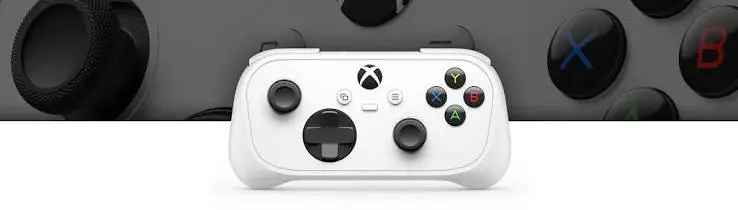
The Xbox Nano Controller is a compact gaming controller designed to work with compatible devices rather than being limited to a traditional Xbox console setup. Its main appeal is portability. A regular controller can take up a surprising amount of space in a backpack or travel bag, particularly if you are already carrying a laptop, phone, headphones, and charging cables. A smaller controller could make gaming away from home easier without forcing you to rely on touch-screen controls.
According to the announced feature list, the controller supports wireless connectivity and Bluetooth, allowing it to connect with compatible devices. The intended uses include PC gaming, mobile gaming, cloud gaming, selected Samsung TVs, and Meta Quest headsets. This gives it a broader purpose than a controller purchased exclusively for one console, although compatibility will depend on the device and the games or services being used.
The controller also features a rechargeable battery and a programmable action button. These additions could make it more practical for everyday use, but the overall experience will depend on how well the controls are laid out and whether the smaller body remains comfortable after an hour or two of playing.
Xbox Nano Controller Price: Is $49.99 Reasonable?
The announced US price is $49.99, placing the Xbox Nano Controller in a range where buyers have plenty of alternatives. That is not an outrageous price for a wireless controller, especially one intended to work across several types of devices. However, shoppers will naturally compare it with a standard Xbox controller, which offers a more familiar size and layout and may be available at a similar price during sales.
The Nano’s value therefore comes down to whether portability is important enough to justify choosing it over a full-sized controller. Someone who regularly plays on a phone during a commute or wants a compact controller for holidays may appreciate the smaller design. On the other hand, someone who mostly plays at home may get more enjoyment from a standard controller that gives their hands more room and is designed for longer sessions.
It is also worth remembering that the $49.99 price is the announced US price. Buyers in other countries may face different retail prices, shipping costs, taxes, or import charges. The final cost could make a difference, particularly if a regular controller is available locally for less money.
Design and Portability: A Smaller Controller Has Its Advantages
The strongest selling point of the Xbox Nano Controller is its compact design. A controller that fits easily into a small bag is useful when you want to play during a trip, at a friend’s house, or in a hotel room without packing a full-sized accessory. It could also be handy for mobile cloud gaming, where carrying a dedicated controller is often more comfortable than attaching a bulky accessory to a phone.
However, size is only one part of a controller’s design. The shape of the grips, spacing between the buttons, placement of the analogue sticks, and ease of reaching the triggers all affect how comfortable it feels. A compact controller might be perfectly fine for short gaming sessions but become tiring during longer matches, particularly for players with larger hands.
Until the controller has been tested in person, it is difficult to say whether its smaller dimensions strike the right balance between portability and comfort. I would not assume that it feels as good as a standard Xbox controller simply because it carries the Xbox name. The best compact controller is one that remains comfortable to hold and easy to operate, not merely one that takes up less space.
Wireless Connectivity and Device Compatibility
The Xbox Nano Controller is advertised with wireless and Bluetooth connectivity, which should make it useful for gamers who switch between different devices. For example, you might play a game on your PC at home, use a compatible smartphone while travelling, or connect to a supported television for cloud gaming. Having one small controller for several setups could save you from carrying separate accessories.
Still, compatibility needs to be checked carefully. Support for PCs, smartphones, selected Samsung TVs, and Meta Quest headsets does not necessarily mean that every model or operating system will work. The game or cloud gaming service must also support controller input, and some devices may require specific settings or software versions.
Wireless performance is another detail that deserves attention. A controller can advertise Bluetooth connectivity and still deliver a disappointing experience if the connection drops, input feels delayed, or pairing becomes a hassle. These issues matter more in fast-paced games, where even small delays can affect aiming, timing, and movement. The announced feature list alone does not establish how reliable the connection will be in everyday use.
Rechargeable Battery and Programmable Action Button
A rechargeable battery is a welcome feature because it means you do not have to keep buying disposable batteries to use the controller. It should be convenient for travel and regular mobile gaming, although the battery’s actual runtime and charging time are important details that buyers will want to know. Without confirmed real-world battery tests, it would be premature to promise that it will last through several long gaming sessions.
The programmable action button could also be useful, depending on what it allows users to customise. Being able to assign a preferred action or shortcut may make certain games easier to control, particularly when playing on a smaller device. However, the feature’s usefulness depends on the available customisation options and whether they work consistently across supported platforms.
These additions sound practical, but they are not enough on their own to make the Nano a better purchase than a standard controller. Battery life, button responsiveness, ease of programming, and everyday comfort will ultimately determine whether the design works well.
Does the Xbox Nano Controller Support Vibration?
Vibration can make games feel more immersive, from the rumble of a vehicle to the impact of an explosion or the feedback of an action in a racing game. However, vibration support has not been clearly established in the information available for this review, so buyers should not assume the Nano includes it.
If vibration is absent, that may not matter much to someone who mainly plays casual games or uses the controller for cloud gaming on the move. For players who rely on rumble feedback, though, its absence could be a noticeable compromise, particularly when comparing the Nano with a standard controller.
This is one of the details worth confirming before buying. A compact controller can still provide a satisfying experience, but buyers should know which features have been retained and which may have been left out to keep the size and price down.
Who Should Buy the Xbox Nano Controller?
The Xbox Nano Controller makes the most sense for gamers who value portability above everything else. If you often play games on your smartphone, use cloud gaming while travelling, or want a controller that is easy to keep in a laptop bag, its smaller design could be appealing. It may also suit people who move between several compatible devices and would rather carry one compact controller than a full-sized model.
However, it may not be the best option for everyone. Players who spend hours gaming at a desk or on a console may prefer the more substantial grips and familiar layout of a regular controller. Those who play competitive games should also pay attention to input responsiveness, stick precision, and button spacing rather than assuming the Nano will perform just as well because it is part of the Xbox family.
The price matters, too. At $49.99, the Nano needs to offer more than a smaller footprint to stand out. If it sacrifices comfort or important features, some buyers may be better off purchasing a standard controller instead.
Is the Xbox Nano Controller Worth Buying?
The Xbox Nano Controller has a sensible idea behind it: give gamers a compact, rechargeable controller that can travel between compatible devices without taking up much room. Its announced Bluetooth connectivity and support for PCs, smartphones, selected Samsung TVs, and Meta Quest headsets could make it a useful accessory for people who enjoy gaming away from a traditional console setup. The programmable action button may also be a welcome extra if it offers enough flexibility.
My main hesitation is that the information currently available does not answer every question that matters when choosing a controller. Comfort during long sessions, real-world battery life, vibration support, connection reliability, and the feel of the buttons all need to be established before it is possible to judge the product fairly. A compact controller can look great on paper but still disappoint if its controls feel cramped or its features are too limited.
The Xbox Nano Controller could be worth considering if you need a small controller for mobile gaming, travel, or compatible devices around the house. At $49.99, however, I would wait for hands-on reviews that test its comfort, battery performance, and actual compatibility before recommending it over a standard Xbox controller. If you mainly play at home and rarely carry your controller anywhere, the smaller size may not offer enough of an advantage to justify the purchase.