
I’ve tested my fair share of smart locks, but the Wyze Palm Lock immediately caught my attention for one reason: it doesn’t just rely on fingerprints or PIN codes. Instead, it uses palm vein scanning technology, a feature that sounded futuristic and almost sci-fi when I first read about it. At $130 retail, Wyze promises this lock is not only faster but also more secure than your standard fingerprint lock. I decided to try it out on my front door to see if the hype held up.
Installation: Easier Than I Expected
Wyze tends to design products with DIYers in mind, and the Palm Lock was no exception. The setup took me about 25 minutes with just a screwdriver. The instructions in the app were clear, and everything paired smoothly with my existing Wyze app. If you’ve ever swapped out a deadbolt before, this process won’t intimidate you.
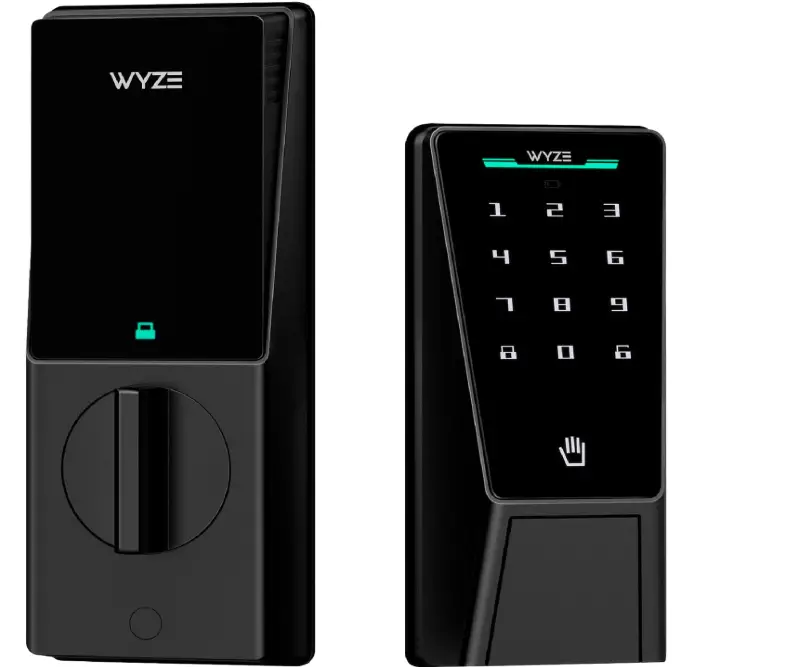
What impressed me most was how slim and modern the lock looks on the door. Unlike some bulky smart locks that scream “tech gadget,” this one has a clean, minimal aesthetic that blends in nicely.
Palm Vein Scanning: Gimmick or Game-Changer?
This is where Wyze really sets itself apart. Instead of pressing a finger to a sensor, you simply hover your palm over the reader, and it scans the unique vein patterns beneath your skin. No smudges, no worries about wet or dirty fingers messing things up.
In practice, it worked surprisingly well. Recognition was fast, usually under a second and I didn’t have to touch anything, which felt more hygienic. Even in low light, the sensor picked up my palm without an issue.
That said, there were a couple of times it didn’t register right away. I had to re-position my hand to get it to read correctly. It wasn’t a dealbreaker, but worth noting if you expect flawless performance every time.
Security and Everyday Use
The palm vein tech feels a lot harder to spoof than a fingerprint. Wyze claims it’s nearly impossible to replicate, and while I can’t test that fully, I do feel more secure knowing it’s not just relying on a surface scan.
The lock also integrates with the Wyze app, so I could check logs of who unlocked the door and when. I set up temporary codes for a friend, and it worked seamlessly. Auto-lock is another feature I didn’t know I needed until I had it, no more second-guessing whether I locked the door on my way out.
Battery life has been decent so far. After a month of daily use, it’s still above 80%. Wyze says it should last several months on four AA batteries, and replacements are straightforward.
What I Didn’t Love
App dependence: Like most Wyze products, you really need the app to unlock its full potential. If you’re not already in their ecosystem, it’s another thing to install.
Occasional misreads: As mentioned, the palm scanner isn’t perfect. Maybe 1 out of 10 times, I had to adjust my hand for it to work.
No physical key backup: This lock goes all-in on tech. If the batteries die and you don’t have your phone handy, you could be stuck outside. (Wyze does provide a USB-C port for emergency power, but I’d prefer a keyhole just in case.)
Is the Wyze Palm Lock Worth $130?
For me, yes, with caveats. The Wyze Palm Lock feels futuristic and genuinely adds convenience to daily life. The palm vein scanner is more than just a gimmick; it’s fast, hygienic, and arguably more secure than fingerprints. At $130, it’s also more affordable than some premium smart locks with fewer features.
That said, it’s not perfect. The lack of a physical key backup could be a dealbreaker for some, and the occasional scan hiccups might frustrate you if you’re in a rush.
If you’re already in the Wyze ecosystem and want a smart lock that feels like something out of the future, the Wyze Palm Lock is a solid buy. Just keep some batteries on hand and get used to holding your palm steady.
After living with the Wyze Palm Lock for a while, I can honestly say it feels like a small step into the future of home security. The palm vein scanning is quicker than I expected and far more reliable than fingerprint locks I’ve tried in the past. It’s not just a neat party trick, it actually makes everyday comings and goings smoother, especially when my hands are full or messy.
That said, it’s not without its quirks. The lock can be a little temperamental with lighting conditions, and the installation takes some patience if you’re not handy with tools. Still, for $130, it’s one of the more affordable smart locks that introduces biometric tech usually reserved for high-security environments.
Conclusion
If you’re looking for a balance of innovation, practicality, and price, the Wyze Palm Lock deserves a serious look. It’s not perfect, but it’s a refreshing alternative to PIN codes and fingerprints, and for me, it’s been worth the switch.
Check out the Frownies Patch I reviewed earlier.
You mention it lacks a key lock but according to Wyze it does have a key lock.