
A lot of people have been getting strange text messages or emails lately containing something called a Microsoft single-use code. The message usually looks harmless at first:
“Your Microsoft account single-use code is…”
The weird part is many people receiving these codes never requested them in the first place.
That’s where the panic starts.
People immediately assume their email has been hacked, someone is trying to break into their account, or Microsoft itself is compromised. In reality, these random Microsoft single-use code messages are usually connected to phishing attempts, account takeover attempts, or scammers trying to trick people into giving away the code themselves.
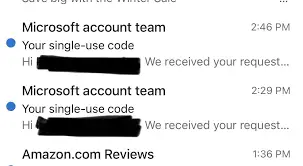
What Is A Microsoft Single-Use Code?
A Microsoft single-use code is a legitimate security feature used for logging into accounts connected to Microsoft services like Outlook, Hotmail, Xbox, OneDrive, and Office.
The code is supposed to confirm it’s really you trying to sign in. Normally, you only receive one after requesting a login or password recovery attempt yourself.
Why Are Random People Receiving These Codes?
Most of the time, it means one of two things:
-Someone accidentally entered your email or phone number while trying to log into their own account
or
-A scammer is actively trying to access your Microsoft account
The second scenario is the bigger concern.
The Real Scam Usually Starts After The Code
This is where people get trapped.
The scammers often send phishing emails, fake customer support messages, or even phone calls pretending to be from Microsoft support. Then they ask for the verification code “to secure the account.”
That code is the key.
If you give it away, scammers can sometimes complete the login process themselves and take over the account.
Microsoft Is Not Randomly Calling You
One major red flag is when scammers pretend to be Microsoft employees.
Microsoft does not cold-call people demanding verification codes or threatening account shutdowns through random phone numbers.
Any message pressuring you to urgently share a security code should immediately raise suspicion.
Why This Scam Works So Well
The scam succeeds because the code itself is real.
That’s what confuses people.
Victims see an actual Microsoft verification message on their phone or email, so they assume the caller or email must also be legitimate.
But the scammers are simply triggering the real code request while pretending to “help” solve the problem they secretly created.
Common Signs Of The Microsoft Single Use Code Scam
You Didn’t Request The Code
That’s usually the first warning sign.
Someone Contacts You Immediately After
Scammers often follow up quickly pretending to be support agents.
Urgent Language
Messages claiming your account will be locked, hacked, or deleted are designed to create panic.
Requests For The Actual Code
Legitimate companies rarely ask you to read security codes aloud to someone.
What You Should Do If You Receive One
Don’t Share The Code
This is the most important step.
Change Your Password
If you suspect someone is targeting your account, update your password immediately.
Enable Two-Factor Authentication
Extra security layers make account theft much harder.
Check Login Activity
Microsoft accounts allow users to review recent sign-in attempts and suspicious devices.
Ignore Fake Support Calls
Never trust random callers claiming to be Microsoft technicians.
What If You Already Shared The Code?
If you already gave the code to someone:
-Change your Microsoft password immediately
-Enable two-factor authentication
-Check recovery email and phone settings
-Review recent account activity
-Remove unfamiliar devices
Speed matters here because scammers often move quickly once they gain access.
Why These Scams Keep Growing
Scammers know Microsoft accounts are valuable because they often connect to:
-Email accounts
-Cloud storage
-Xbox accounts
-Saved passwords
-Payment methods
-Work documents
One stolen account can expose a huge amount of personal information, which is why these attacks have become so common.
Is The Microsoft Single Use Code Message A Scam?
The Microsoft single-use code itself is real, but unexpected codes often mean someone is trying to access your account or manipulate you into handing over login verification details.
The biggest mistake people make is assuming the scam is the message itself. Usually, the real scam comes right after, through fake support calls, phishing emails, or urgent requests asking for the code.
What Do You Do When You Suspect A Phishing Attempt
In this digital age and time, almost everyone has at one time received a phishing text or email and often times they fall victim and get scammed. This is why it is imperative that you are always careful when you receive any text or email because one careless click on a link can cause a whole lot of problems for you. Now if you suspect a phishing attempt, here is what I advise you do:
- Do Not Respond to the text, because you responding is actually giving access to the scammers, simply delete it when you receive.
- Quickly change your password if you have mistakenly clicked on the link or given away your login details. Change your password to a strong and unique password.
- Keep an eye on your accounts for any unauthorized transactions.
- Also scan you devices for any malware.
By following these tips, you can significantly reduce your risk of falling victim to phishing scams and keep your personal and financial information safe.
Conclusion
If you receive a code you didn’t request, treat it as a warning sign, secure your account, and never share the code with anyone claiming they need it for “verification.”
Just like the NYC Unpaid Ticket Scam Text we reviewed earlier, The Microsoft Single Use Code are part of a larger trend of phone-based fraud. They prey on trust and urgency, but once you know the red flags, they’re easy to spot. If it sounds too good to be true, or if someone asks for money or data over the phone, it’s a scam. Protect yourself by hanging up, verifying directly, and reporting suspicious activity.