
Scam texts are getting way too convincing lately, and I almost learned that the hard way.
Last night, I was literally standing in my kitchen making pasta, trying not to get flour everywhere, when my phone buzzed with a text message that looked like it came from Amazon. The message claimed there was an issue with a recent order and said I needed to click a link to process a refund.
At first glance, it looked completely believable.
It even included a fake order number that looked realistic enough to make me stop and think for a second.
Why The Amazon Refund Scam Works So Well
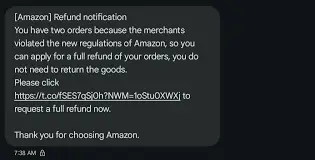
The scary part about these scams is they don’t always look obviously fake anymore.
Years ago, scam texts were full of weird grammar, random symbols, and terrible spelling. Now? Some of them look almost identical to real company notifications. This one caught me at the perfect distracted moment too. I was busy, tired, and immediately thought:
“Wait… did something happen with one of my orders?”
That little moment of uncertainty is exactly what scammers rely on.
The Fake Amazon Login Page Looked Real
I clicked the link before fully thinking it through. The page that opened looked almost exactly like Amazon’s login screen. Same colors. Same layout. Same style.
But then something felt off. I looked closer at the URL and saw something ridiculous like:
“amazon-refunds-support.co” That’s when my brain finally woke up, it wasn’t the real Amazon website at all.
The Biggest Red Flag: I Hadn’t Ordered Anything
That’s what snapped me out of it completely, I stopped and thought:
“Why would I even be getting a refund?” I hadn’t ordered anything recently that would trigger some random refund process. I immediately backed out of the page and opened the real Amazon app directly from my phone instead.
Sure enough:
-No refund
-No account issue
-No order problem
-Nothing suspicious at all
This Is A Classic Phishing Scam
What I ran into is basically a phishing scam disguised as an Amazon refund alert.
The goal is simple:
-Get you worried
-Make you click quickly
-Trick you into entering your Amazon login details
Once scammers get your email and password, they can potentially:
-Access saved payment methods
-Place fraudulent orders
-Steal personal information
-Use the same password on other accounts
Why These Scams Are Becoming More Dangerous
The fake websites are getting much better now. Some of them copy real company pages almost perfectly, especially on mobile phones where people rarely stop to inspect website URLs carefully. And scammers know people trust brands like Amazon because millions of people use them daily. That familiarity lowers people’s guard instantly.
Signs The Amazon Refund Text Was Fake
Suspicious Website URL
The link wasn’t an official Amazon domain.
Unexpected Refund Alert
There was no real issue with my account or orders.
Pressure To Act Quickly
Scam texts usually want immediate clicks before you pause and think.
Asking For Login Information
Legitimate companies rarely ask users to verify accounts through random text links.
What To Do If You Get One Of These Texts
Don’t Click The Link
Even if the message looks convincing.
Open The Official App Instead
Check your account directly through the real Amazon app or website.
Verify The URL Carefully
Scam websites often use fake domains that look close to the real thing.
Delete And Block The Number
It won’t stop every scam, but it helps reduce repeat attempts.
Change Your Password If You Entered Anything
If you typed login details into a fake page, change your password immediately.
These Scammers Rely On Distraction
That’s really the biggest takeaway here. Nobody falls for these things because they’re “stupid.” Most of the time it happens because people are busy, distracted, stressed, tired, cooking dinner, at work, half-awake, or multitasking when the message arrives. Scammers know that, they build these fake alerts specifically to trigger fast emotional reactions before logic catches up.
The Amazon Refund Text Scam Is Very Real
The Amazon refund text scam is one of those phishing scams that feels harmless until you realize how realistic the fake websites have become. A quick moment of distraction is sometimes all it takes for someone to accidentally hand over sensitive account information.
Tips to Avoid Phishing Scams:
- Be Skeptical of Unexpected Communications:
- Be cautious with unsolicited emails, texts, or calls, especially those asking for personal or financial information.
- Verify the Source:
- Always verify the sender’s email address or phone number. Scammers often use addresses or numbers that look similar to legitimate ones.
- Look for Red Flags:
- Check for spelling and grammatical errors, generic greetings (e.g., “Dear Customer”), and urgent or threatening language.
- Don’t Click on Suspicious Links:
- Hover over links to see the actual URL before clicking. If it looks suspicious or doesn’t match the purported sender, don’t click it.
- Check the Website’s Security:
- When entering personal information online, ensure the website is secure. Look for “https://” in the URL and a padlock icon in the browser’s address bar.
- Avoid Downloading Attachments:
- Don’t open email attachments from unknown or suspicious sources. These could contain malware.
- Use Multi-Factor Authentication (MFA):
- Enable factor Authentication on your accounts so as to add an extra layer of security. This makes it harder for scammers to gain access even if they have your password.
- Report Phishing Attempts:
- Report suspicious emails to your email provider and the organization being impersonated. In the U.S., you can forward phishing emails to the Anti-Phishing Working Group at [email protected] and to the FTC at [email protected].
What Do You Do When You Suspect A Phishing Attempt
In this digital age and time, almost everyone has at one time received a phishing text or email and often times they fall victim and get scammed. This is why it is imperative that you are always careful when you receive any text or email because one careless click on a link can cause a whole lot of problems for you. Now if you suspect a phishing attempt, here is what I advise you do:
- Do Not Respond to the text, because you responding is actually giving access to the scammers, simply delete it when you receive.
- Quickly change your password if you have mistakenly clicked on the link or given away your login details. Change your password to a strong and unique password.
- Keep an eye on your accounts for any unauthorized transactions.
- Also scan you devices for any malware.
By following these tips, you can significantly reduce your risk of falling victim to phishing scams and keep your personal and financial information safe.
Conclusion
The safest habit now is simple:
Never trust unexpected refund texts, account alerts, or verification messages at face value. Always go directly to the official app or website yourself instead of clicking links sent through random texts or emails.
That tiny extra step can save you a massive headache later.
Just like the NYC Unpaid Ticket Scam Text we reviewed earlier, The Amazon Refund Text Scam are part of a larger trend of phone-based fraud. They prey on trust and urgency, but once you know the red flags, they’re easy to spot. If it sounds too good to be true, or if someone asks for money or data over the phone, it’s a scam. Protect yourself by hanging up, verifying directly, and reporting suspicious activity.