
If you’ve been searching for an xTool O1 Omni Printer review, you’re probably wondering whether this all-in-one machine is really as impressive as the advertisements make it seem. The idea of having one desktop printer that can handle UV printing, Direct-to-Garment (DTG), Direct-to-Film (DTF), and UV-DTF printing is certainly appealing, especially if you’re running an Etsy shop, a small printing business, or creating personalized products from home.
The xTool O1 Omni has generated plenty of excitement since its launch in 2026, but with a premium price tag, it’s worth asking an important question: Is the xTool O1 Omni Printer actually worth the investment, or are you better off buying separate machines?
After looking into its features, capabilities, and overall value, here’s my honest opinion.
What Is the xTool O1 Omni Printer?
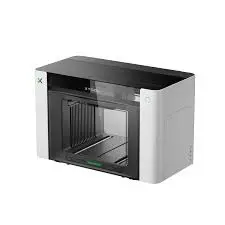
The xTool O1 Omni UV 4-in-1 Printer is an all-in-one desktop production machine designed for creators, small businesses, crafters, and print-on-demand sellers.
Instead of purchasing separate printers for different applications, the O1 Omni combines four printing technologies into a single system:
- UV Printing
- Direct-to-Garment (DTG)
- Direct-to-Film (DTF)
- UV-DTF Printing
This allows users to create customized products across a wide variety of materials using one machine.
For many small businesses, that’s one of its biggest selling points.
What Can the xTool O1 Omni Print On?
One feature that immediately caught my attention is its material compatibility.
According to xTool, the printer supports printing on materials including:
- Wood
- Acrylic
- Glass
- Leather
- Metal
- Fabric
- Plastic
- Ceramic
- Phone cases
- Promotional products
- Personalized gifts
For anyone selling custom products online, that level of versatility opens up a lot of creative possibilities. Instead of limiting yourself to apparel or hard surfaces, you can diversify your product catalog using one production system.
Who Is the xTool O1 Omni Designed For?
In my opinion, this printer makes the most sense for:
- Etsy sellers
- Small business owners
- Print-on-demand startups
- Makers and hobbyists
- Custom gift businesses
- Personalized product creators
- Small production studios
If your business regularly produces multiple types of customized products, consolidating several machines into one workspace could simplify your workflow.
Print Quality
Based on the available demonstrations and product information, the xTool O1 Omni appears capable of producing detailed, vibrant prints across different materials.
Of course, print quality depends on several factors, including:
- Artwork resolution
- Material preparation
- Printer calibration
- Ink quality
- User experience
Like any professional printing system, there will likely be a learning curve before consistently achieving the best results.
Software Experience
Software often determines whether a printer becomes enjoyable, or frustrating, to use.
The O1 Omni integrates with xTool’s software ecosystem, which is already familiar to many users of the company’s laser engravers and creative machines.
If you’ve previously used xTool products, you’ll probably feel comfortable navigating the interface.
New users should still expect to spend some time learning print settings, color management, and workflow optimization before reaching professional-quality output.
The Biggest Advantage: Four Machines in One
This is easily the printer’s strongest feature.
Buying separate equipment for:
- UV printing
- DTG
- DTF
- UV-DTF
can quickly become expensive while taking up significant workspace.
The O1 Omni brings those capabilities together in a single desktop unit.
For businesses that regularly produce a variety of products, this integration could save both space and production time.
Things to Consider Before Buying
Even though the printer offers impressive versatility, there are still a few practical considerations.
Initial Investment
This isn’t an entry-level hobby printer.
The upfront cost may be difficult to justify for someone just starting a small business.
If you’re only printing occasionally, it could take time to recover your investment.
Ink and Maintenance Costs
Like any professional printer, ownership costs extend beyond the purchase price.
Before buying, factor in:
- Ink replacement
- Cleaning supplies
- Maintenance routines
- Replacement parts
- Consumables
- Downtime for servicing
These ongoing expenses can significantly affect your overall cost of ownership.
Is One Machine Better Than Four Dedicated Machines?
Not necessarily.
While all-in-one systems offer convenience, dedicated printers often outperform hybrid machines in their specific specialty.
For example, if your business focuses almost exclusively on apparel printing, a dedicated DTG or DTF printer may offer better long-term
The same applies if your business primarily produces UV-printed promotional products.
Choosing the right machine depends on your production needs.
Customer Support
xTool has built a recognizable reputation within the maker community through its laser engravers, CNC products, and creative equipment.
That’s generally reassuring when compared with unknown brands that appear online overnight. Even so, I always recommend researching recent customer experiences involving:
- Technical support
- Warranty claims
- Software updates
- Spare parts availability
- Repair turnaround times
Reliable support becomes especially important when your equipment is generating business income.
Pros
- Combines UV, DTG, DTF, and UV-DTF printing in one machine
- Supports a wide variety of materials
- Excellent flexibility for creators and small businesses
- Space-saving design compared to owning multiple printers
- Backed by an established company with experience in creative hardware
Con
- Premium purchase price
- Ongoing ink and maintenance costs
- Learning curve for beginners
- Dedicated single-purpose printers may offer better value for specialized businesses
- Not every user needs all four printing technologies
Is the xTool O1 Omni Printer a Scam?
No. Based on the available information, I wouldn’t consider the xTool O1 Omni Printer a scam. It is a genuine product from an established company that has released multiple creative machines over the years.
The more important question isn’t whether it’s legitimate—it’s whether it’s the right investment for your business.
That’s where careful comparison becomes essential.
Should You Buy the xTool O1 Omni?
If you’re running a business that creates a wide variety of personalized products, the O1 Omni could significantly simplify your production process by combining multiple printing methods into one machine.
On the other hand, if your work revolves around only one printing application, investing in a dedicated printer designed specifically for that purpose may be the smarter financial decision.
Before purchasing, compare not only the initial price but also software usability, maintenance costs, ink expenses, replacement parts, warranty coverage, and customer support.
What I Think
The xTool O1 Omni UV 4-in-1 Printer stands out because it offers something few desktop machines currently provide: the ability to perform four different printing methods in one compact system.
That versatility alone makes it an exciting option for Etsy sellers, makers, and small businesses looking to expand their product offerings without filling their workspace with multiple machines. While it isn’t the cheapest option on the market, and ongoing operating costs should be carefully considered, I don’t see it as an overhyped gimmick. Instead, it appears to be a legitimate production tool that could offer real value for businesses that will actually use its full range of capabilities.
Conclusion
As with any major equipment purchase, take the time to compare your workflow, budget, and long-term business goals before making the investment.
Check out the Frownies Patch I reviewed earlier.