
A message telling you that your Facebook or Instagram account is about to be deleted is the sort of thing that can make you panic before you’ve even had time to think about it. The message may carry Meta branding, mention “Meta Verified,” and tell you that your account has violated a policy or is scheduled for restriction unless you verify your identity. There may be a button that says something like “Verify Now,” “Appeal Account,” or “Confirm Your Account,” and the whole thing can look convincing enough to fool someone who normally knows better.
This is the Meta Verified message scam, and the important thing to understand is that the message isn’t trying to help you protect your account. It is trying to make you nervous enough to click a link and hand over your login details.
I wanted to look at this scam from the perspective of somebody actually receiving one of these messages because the most effective phishing attempts aren’t necessarily the ones with terrible spelling and obvious mistakes. The better ones use the names and branding people already recognize, create a sense of urgency and give you a problem that supposedly needs to be fixed immediately. When the account being threatened is one you’ve spent years building, that pressure can work surprisingly well.
What Is the Meta Verified Message Scam?
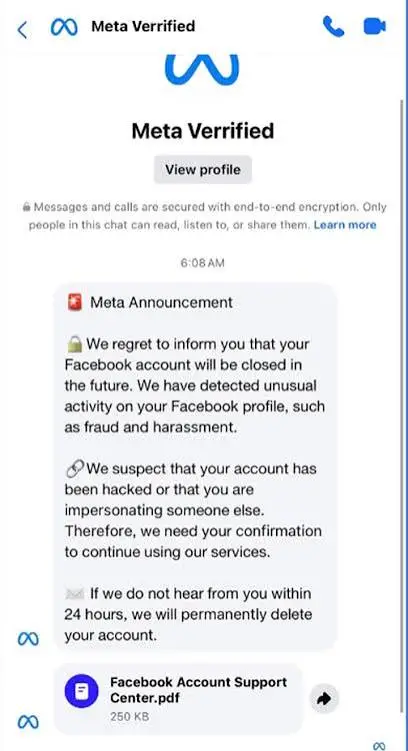
The Meta Verified scam is a phishing campaign in which criminals impersonate Meta and send messages claiming there is a problem with your Facebook or Instagram account. The story varies, but the basic setup is usually the same: your account has supposedly violated a rule, your Meta Verified status is at risk, or your account will be restricted or deleted unless you complete a verification process.
The message then directs you to a website.
That website is the real trap.
Instead of taking you to a genuine Meta login page, the link can lead to a fake page designed to look like Facebook, Instagram or another legitimate Meta service. You may be asked to enter your email address, phone number, password or another piece of information that the scammer can use to take control of your account.
The criminals don’t necessarily need to hack their way into your account. They are trying to persuade you to give them the key.
The “Your Account Will Be Deleted” Message
The threat of losing an account is one of the oldest tricks in phishing, but it works because it creates exactly the reaction scammers want.
You might receive a message saying your account is scheduled for deletion because of a copyright complaint, community-standard violation, suspicious activity or some other alleged problem. Another version may say that your account has been reported and you have only a limited amount of time to appeal.
The wording is designed to make you feel that you need to act now.
That’s important because phishing depends heavily on urgency. If you have an hour to investigate the message, check the sender and open Facebook yourself, the scam becomes much harder to pull off. If you believe you have ten minutes before your account disappears forever, you’re much more likely to click the button sitting right in front of you.
The account-deletion threat is therefore less about what Meta supposedly did and more about what the scammer wants you to do next.
What Does Meta Verified Have to Do With It?
Meta Verified is a genuine subscription service offered by Meta for eligible Facebook and Instagram accounts. That makes the name particularly useful to scammers because people have already seen the term associated with identity verification, account security and verification badges.
A fraudulent message can therefore use phrases such as “Meta Verified,” “verification required,” “verified account,” or “Meta support” without immediately looking ridiculous.
Someone who has a verified account may be especially worried about losing the status they’ve paid for. Someone who doesn’t have Meta Verified might still believe the message because the phrase sounds official.
The important point is that seeing the words “Meta Verified” does not mean the message came from Meta.
Scammers routinely borrow the names of real companies, services and security features because familiarity makes a fake message easier to believe.
The Fake Meta Login Page
The next step is where the scam becomes much more dangerous.
After clicking the link, you may land on a page that looks almost identical to a normal Facebook or Instagram login screen. It may have the familiar logo, colors and general layout, with a form asking you to sign in.
This is where many victims make the mistake that the scammer is hoping for.
They enter their normal username and password.
The information doesn’t go to Meta. It goes to the person operating the phishing page.
Once a scammer has your credentials, they may attempt to log into your account, change the password, replace the recovery email address or phone number and lock you out. Depending on what else is connected to the account, the consequences can extend beyond losing access to Facebook or Instagram.
For someone who uses social media for business, the situation can become particularly serious. A compromised account can be used to contact customers, promote fraudulent links, impersonate the account owner or attempt to scam the person’s followers.
Why the Fake Message Can Look So Convincing
People sometimes assume phishing messages are easy to recognize because the scammer will spell everything incorrectly and use an obviously fake logo.
That isn’t always the case.
A convincing phishing message can copy the general appearance of a legitimate Meta notification and use language that sounds official. It can include your name, refer to your account and contain familiar branding. The website you land on may also be carefully designed to look like the real thing.
That’s why I wouldn’t use appearance alone as proof that a Meta Verified message is genuine.
The sender information and destination website matter far more than the logo at the top of the message.
And even then, the safest option is not to interact with the message at all. If you are genuinely concerned about your account, open Facebook or Instagram yourself and check for notifications or account-status information inside the official app or website.
Is Meta Verified Going to Delete Your Account?
If an unexpected message says your account will be deleted unless you click a verification link, don’t assume the threat is genuine.
The easiest way to check is to completely ignore the link and sign into your account through the normal Facebook or Instagram app. If there is a legitimate account issue that requires your attention, look for the notification there.
You don’t need to follow a random link in an email, text message or direct message to discover whether your account is in trouble.
This is one of those situations where taking an extra minute is much safer than reacting immediately.
The “Appeal Your Account” Trick
Another common variation involves an appeal.
The message may say that Meta has detected a violation and that you have a short period to submit an appeal. A button takes you to a page where you are supposedly asked to explain what happened.
The appeal form may then request your Facebook or Instagram login information.
That is the point at which the supposed appeal turns into credential theft.
There is nothing wrong with appealing a legitimate account decision through Meta’s own systems. The problem is allowing an unsolicited message to decide where you go to complete that process.
If you need to appeal something, start inside the official platform rather than through the link supplied by a suspicious message.
Meta Verified Scam on Instagram
The same basic scam can target Instagram users.
An Instagram account can be extremely valuable to its owner, especially if it has a large following, sells products, promotes a business or has years of photographs and conversations attached to it. Telling somebody that their Instagram account is about to disappear is therefore a very effective way of creating panic.
A fake Instagram message may claim that you’ve violated copyright rules, used misleading information, breached community guidelines or failed a verification check.
The details change, but the objective stays the same: get you to click.
Once you reach the fake login page, the scammer has moved the conversation away from Instagram and into an environment they control.
Meta Verified Scam on Facebook
Facebook users can receive similar messages.
A scammer might claim that your page has received a complaint, that your account has violated Meta’s policies or that your profile needs to be verified to prevent suspension.
This can be particularly effective against people who manage Facebook business pages because losing access could mean losing contact with customers and followers.
If you receive a message like this, don’t let the possibility of losing your page push you into making a rushed decision. Open Facebook directly and check your account status through the platform.
If nothing is wrong, the message was simply trying to manufacture a crisis.
What Happens If You Entered Your Password?
If you already entered your Facebook or Instagram password into a website from a suspicious Meta Verified message, don’t sit around waiting to see what happens.
Go directly to the genuine Facebook or Instagram service and change your password. If you use that same password anywhere else, change it there too. Reusing passwords gives scammers a much bigger opportunity if one set of credentials has been exposed.
You should also review the account’s security settings and check for unfamiliar login activity, recovery addresses, phone numbers or connected devices.
If you can no longer access the account, use Meta’s official account-recovery process rather than contacting someone who claims to be “Meta support” through the suspicious message.
And be careful about the second wave of scams. Once criminals know you’ve fallen for one phishing attempt, they may contact you again pretending to be a recovery agent who can get your account back.
That can turn one scam into two.
What If You Only Clicked the Link?
Clicking a phishing link isn’t the same as handing over your password.
If you opened the page but didn’t enter your credentials, payment information or other personal details, the immediate risk may be considerably lower. Close the page and don’t interact with it further.
If anything downloaded automatically, don’t open the file. Run a security scan and make sure your operating system and browser are up to date.
The bigger mistake would be assuming that, because you’ve already clicked the link, you might as well complete the form. You can simply close the page and stop there, particularly if you haven’t entered your password, security code, payment information or other personal details.
What If the Message Asked for a Verification Code?
This is another detail people should take seriously.
If a scammer already has your password, they may try to convince you to send them a code that was delivered to your phone or email. They might describe it as a “Meta verification code” or “security code.”
Don’t give that code to them.
A one-time security code can be exactly what an attacker needs to get through an additional account-security step. If you receive a code you didn’t request, don’t forward it to anybody who contacts you about your account.
Instead, access your account directly and investigate.
How to Check Whether a Meta Message Is Real
The easiest habit is to stop treating the message itself as the place where you need to solve the problem.
If an email says your Facebook account has been restricted, don’t click the button in the email. Open Facebook independently.
If an Instagram message says you need to verify your account, open Instagram independently.
If a message says your Meta Verified subscription is about to be canceled, check the subscription from the official account settings rather than following the link.
This removes the scammer’s biggest advantage: controlling the website you visit.
You should also examine the actual sender address and the website domain carefully, but remember that even a convincing-looking address isn’t a reason to click. The safest verification method is to navigate to the service yourself.
Don’t Trust “Meta Support” Accounts
One particularly frustrating part of these scams is the number of fake support accounts that can appear after somebody posts publicly about having an account problem.
A victim might say, “My Instagram was hacked. Can anyone help?”
Suddenly, several accounts claim to work for Meta and offer to recover the account.
That is not necessarily help.
Scammers monitor public conversations because they know someone who has just lost access to an account is already anxious and looking for assistance. They may ask for a verification code, password, payment or remote access to the computer.
Never give your password or security code to somebody who randomly approaches you claiming to be Meta support.
Is the Meta Verified Message a Scam?
If you received an unsolicited message claiming that your Facebook or Instagram account will be deleted, restricted or suspended unless you click a link to complete Meta Verified verification, treat it as a phishing scam unless you independently verify the notification through the official platform.
The branding can be copied. The logo can be copied. The wording can be copied. Even a convincing-looking login page can be copied.
What the scammer cannot easily copy is the fact that you opened Facebook or Instagram yourself and checked your account from there.
That is why this approach works so well.
Conclusion
The Meta Verified message scam isn’t really about verification at all. The verification story is simply the excuse used to get you moving in the direction the scammer wants.
First comes the threat: your account is going to be deleted, restricted or suspended. Then comes the solution: click this link, verify your identity or submit an appeal. Finally comes the real objective: enter your login information, provide a security code or otherwise give the attacker something they can use against you.
The message may look professional, but that doesn’t make it legitimate.
If you receive a fake Meta Verified message, don’t click the verification button just because you’re worried about losing your Facebook or Instagram account. Open the app yourself and check whether there is actually a problem. If there isn’t, you have your answer.
And if you have already entered your password into a suspicious Meta login page, act quickly rather than hoping nothing happens. Change your password through the genuine service, secure any other accounts that used the same password and review your account’s security settings.
The biggest mistake in these scams is usually not clicking the message. It’s believing that you have to respond to the message in order to protect your account.
You don’t. The message is the thing that needs to be questioned first.
Check out, Apollo Project I talked about earlier on.